Local LLM Concurrent User Load Test - How Many Users Can an RTX PRO 6000 Handle?
If you're planning to self-host an LLM for internal use, the first question is always: how many concurrent users can one GPU actually serve? We loaded an RTX PRO 6000 (96 GB VRAM) with both an 8B and a 32B model, then ran real multi-turn chat simulations from 1 to 200 simultaneous users. Zero errors across every test — but response times tell a very different story depending on model size.
200
Max concurrent users
0%
Error rate (all tests)
3.1x
8B vs 32B speed gap
82 GB
Stable VRAM usage
Test Environment
The goal was to simulate a realistic production workload — not just single-shot completions, but multi-turn conversations with LoRA adapter hot-swapping between requests. This is what an actual enterprise chatbot deployment looks like.
Hardware & Software
Models Under Test
Qwen3-8B-AWQ
VRAM: ~82 GB (model + 5 LoRA adapters + KV cache)
Qwen3-32B-AWQ
VRAM: ~84.5 GB (model + 5 LoRA adapters + KV cache)
Each simulated user ran a 2–4 turn conversation with max_tokens=500, maintaining context across turns. Think time between turns was randomized between 0.3–1 second to approximate real usage. All measurements are non-streaming (full response completion before delivery) — the worst-case scenario for perceived latency.
8B Model Load Test Results
Short Response Benchmark (max_tokens=200)
Before running the full chat simulation, we tested raw concurrent request handling with short responses — the kind you'd see for FAQ lookups or classification tasks.
| Concurrent Users | Total Requests | Median | P95 | GPU Temp |
|---|---|---|---|---|
| 1 | 5 | 428 ms | 1,006 ms | 30°C |
| 5 | 25 | 694 ms | 1,116 ms | 31°C |
| 10 | 50 | 803 ms | 1,214 ms | 33°C |
| 20 | 60 | 901 ms | 1,596 ms | 35°C |
| 50 | 100 | 1,172 ms | 2,063 ms | 36°C |
| 100 | 100 | 1,285 ms | 1,967 ms | 39°C |
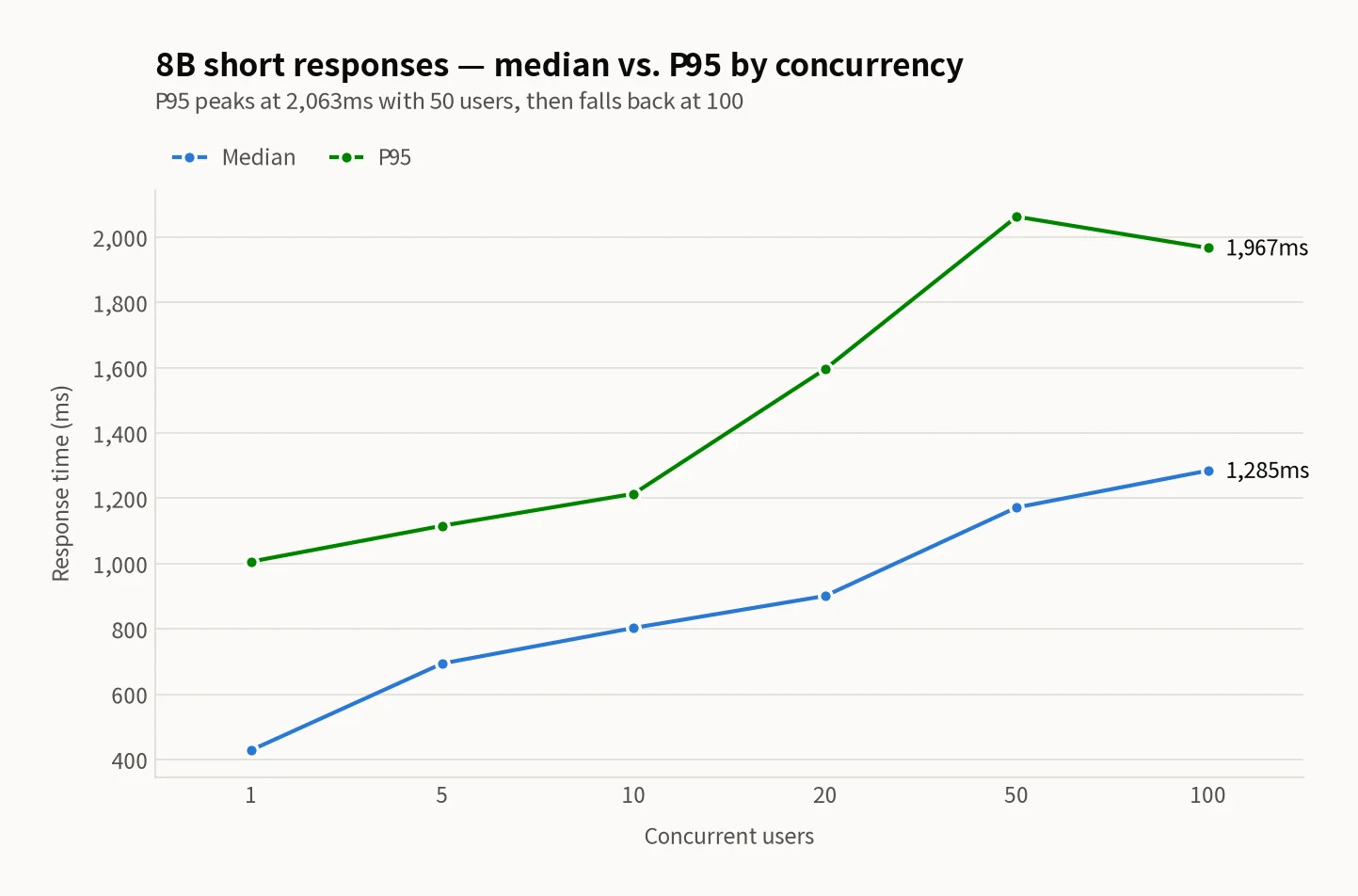
Even at 100 concurrent users, the 8B model kept median response time under 1.3 seconds with zero errors. For short-response workloads like FAQ bots or intent classification, a single GPU handles the load comfortably.
Multi-Turn Chat Simulation (Production Workload)
This is the real test — sustained multi-turn conversations with 500-token responses, which mirrors how an actual chat service operates under load.
| Scenario | Users | Median | P95 | GPU Temp | Throughput |
|---|---|---|---|---|---|
| Normal afternoon | 20 | 3.5s | 4.2s | 43°C | 1,582 tok/s |
| Lunch peak | 50 | 5.4s | 6.5s | 48°C | 2,590 tok/s |
| Event surge | 100 | 8.6s | 10.9s | 62°C | 3,469 tok/s |
| Extreme stress | 200 | 16.9s | 24.1s | 70°C | 3,890 tok/s |
20 users
3.5s
Comfortable
50 users
5.4s
Slightly slow
100 users
8.6s
Frustrating
200 users
16.9s
Unusable
The sweet spot for the 8B model is 20 concurrent users — a 3.5-second median is perfectly acceptable for a chat interface. At 50 users you start feeling the lag, and beyond 100 the non-streaming wait becomes frustrating. However, with SSE streaming enabled, the first token arrives within 1 second even at high concurrency, which dramatically improves perceived latency. And critically, the error rate stayed at 0% across every concurrency level, including the 200-user extreme test.
32B Model Load Test Results
Larger models produce better responses for complex queries, but the throughput penalty is steep. Here's what happens when you run Qwen3-32B-AWQ under the same conditions.
| Scenario | Users | Median | P95 | GPU Temp | Power | Throughput |
|---|---|---|---|---|---|---|
| Normal afternoon | 20 | 10.4s | 11.5s | 61°C | 566W | 650 tok/s |
| Lunch peak | 50 | 16.8s | 18.5s | 74°C | 600W | 1,122 tok/s |
| Event surge | 100 | 26.6s | 34.8s | 80°C | 606W | 1,385 tok/s |
| Extreme stress | 200 | 52.2s | 72.8s | 83°C | 606W | 1,429 tok/s |
The numbers speak clearly: even at just 20 concurrent users, the 32B model takes 10.4 seconds per response — already uncomfortable for interactive chat. At 200 users, the median climbs to 52.2 seconds with P95 at 72.8 seconds, making it effectively unusable without streaming. GPU temperature hits 83°C, dangerously close to the 85°C thermal limit, and power consumption maxes out at the 600W TDP ceiling.
GPU Stability (32B Model)
| Metric | Normal (20 users) | Extreme (200 users) | Safety Limit |
|---|---|---|---|
| Temperature | 61°C | 83°C | 85°C |
| Power draw | 566W | 606W | ~600W TDP |
| VRAM | 84.5 GB | 84.5 GB | 95.6 GB |
| Error rate | 0% | 0% | — |
8B vs 32B: Direct Comparison
Same GPU, same test methodology, same LoRA configuration. The only variable is model size. The performance gap is remarkably consistent.
| Metric | Qwen3-8B | Qwen3-32B | Ratio |
|---|---|---|---|
| VRAM usage | 82.3 GB | 84.5 GB | 1.03x |
| 20 users median | 3.5s | 10.4s | 3.0x slower |
| 50 users median | 5.4s | 16.8s | 3.1x slower |
| 100 users median | 8.6s | 26.6s | 3.1x slower |
| 200 users median | 16.9s | 52.2s | 3.1x slower |
| 20 users throughput | 1,582 tok/s | 650 tok/s | 0.41x |
| 200 users throughput | 3,890 tok/s | 1,429 tok/s | 0.37x |
| 200 users GPU temp | 70°C | 83°C | +13°C |
| 200 users power | 532W | 606W | +74W |
| Error rate | 0% | 0% | Same |
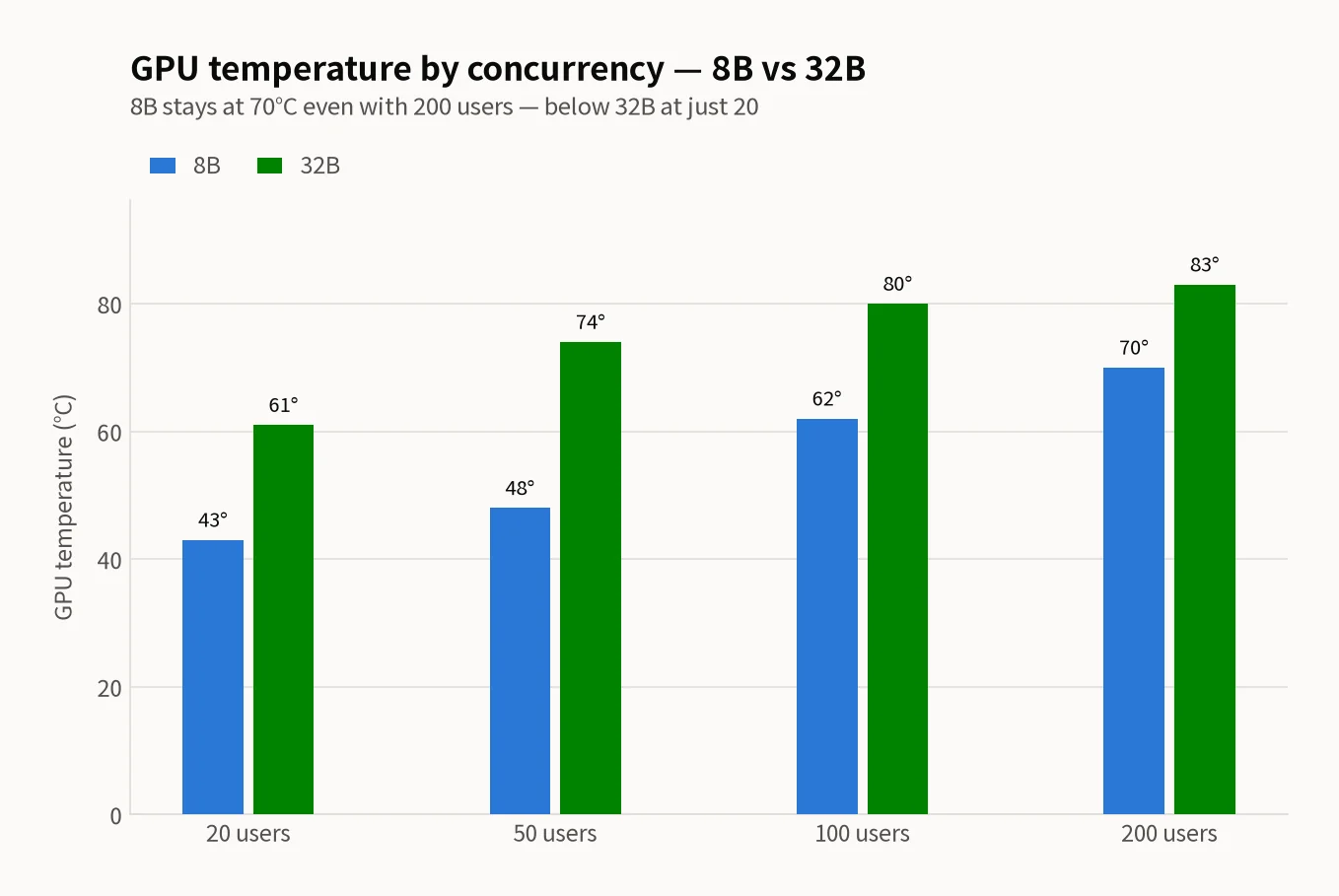
The standout finding is the consistent 3.1x speed difference across all concurrency levels. Regardless of whether you have 20 or 200 users, the 32B model is almost exactly 3.1 times slower than the 8B. VRAM usage is nearly identical (only 2 GB difference), but thermals and power consumption tell a different story — the 32B model runs 13°C hotter and draws 74W more power at peak load.
Production Architecture Recommendations
Based on 12 months of operating these configurations in production, here's the architecture that works:
Recommended Architecture
Default tier: 8B model
Route the majority of traffic to Qwen3-8B-AWQ. Ideal for FAQ, simple guidance, and classification tasks. Comfortably serves 50 concurrent users per GPU.
Premium tier: 32B model (with routing)
Route only complex queries (detailed analysis, multi-step reasoning) to the 32B model. Keep concurrent load under 20 users. SSE streaming is mandatory.
Always enable streaming
With SSE streaming, the first token arrives within 1–2 seconds even under high load. Non-streaming numbers represent the absolute worst case for user experience.
Capacity Planning per GPU
8B Model (per GPU)
- 20 users: comfortable (3.5s)
- 50 users: acceptable with streaming
- 100+ users: add GPUs or scale horizontally
32B Model (per GPU)
- 20 users: streaming required (10.4s)
- 50+ users: add GPUs or switch to 8B
- Thermals: 83°C at peak — close to limit
Operational Notes
- VRAM is independent of concurrency: KV cache is pre-allocated, so VRAM usage stays flat whether you have 1 or 200 users.
- Throughput increases with concurrency: batching efficiency improves under load. The 8B model jumps from 1,582 tok/s at 20 users to 3,890 tok/s at 200.
- LoRA hot-swapping incurs zero performance penalty: all 5 adapters were swapped between requests with no measurable degradation. This makes multi-tenant deployments viable on a single GPU.
- Power limiting can reduce thermals significantly: setting a 350W power cap drops GPU temperature by roughly 22°C with only ~10% performance loss at low concurrency.
Conclusion
A single RTX PRO 6000 with an 8B model can realistically serve 20–50 concurrent users in a production chat application — no errors, reasonable latency, manageable thermals. The 32B model offers better response quality but requires streaming and strict concurrency limits. The consistent 3.1x speed penalty means you're trading raw throughput for smarter answers, so a routing strategy that sends only complex queries to the larger model is the practical approach. For most enterprise self-hosted LLM deployments, start with 8B, add routing when you need it, and scale GPUs when concurrency demands exceed what a single card can handle.
Related Posts
© 2026 TreeRU. All rights reserved.
All content is copyrighted by TreeRU. Unauthorized reproduction without attribution is prohibited.
