GPU Power Limit vs AI Performance - Undervolting and Watt Limit Real Data
Running a local LLM server 24/7 means GPU power directly translates to electricity bills, heat output, and hardware longevity. How much performance do you actually lose when limiting power? We tested RTX 5090 undervolting and RTX PRO 6000 power limiting (600W → 450W → 350W) with llama-bench and real concurrent user load tests.
Why Limit GPU Power?
Electricity cost: Reducing from 600W to 350W saves roughly 40% on monthly GPU power costs. Over a year, this adds up to hundreds of dollars.
Temperature management: Lower power means lower temperatures, which eliminates thermal throttling and reduces fan noise. Critical for office environments.
Hardware longevity: Sustained lower temperatures extend GPU semiconductor lifespan — especially important for 24/7 server operation.
Two approaches exist: undervolting reduces GPU core voltage, while power limiting (via nvidia-smi) caps maximum power draw. We tested both.
RTX 5090 Undervolting Results
Tested with Qwen2 32B Q4_K_M model, comparing stock vs undervolted performance.
| Benchmark | Stock | Undervolted | Change |
|---|---|---|---|
| Prompt Processing (pp512) | 3,519 t/s | 2,849 t/s | -19.0% |
| Token Generation (tg256) | 69.83 t/s | 67.20 t/s | -3.8% |
Prompt processing dropped 19% because it is bandwidth-intensive and sensitive to voltage changes. But token generation (what users actually perceive) dropped only 3.8%. Token generation is compute-intensive, making it relatively resilient to undervolting.
RTX PRO 6000 Power Limit (600W vs 450W)
Tested with 70B and 72B models using llama-bench at stock 600W and 450W power limit.
| Model | Benchmark | 600W | 450W | Change |
|---|---|---|---|---|
| Llama 3.3 70B | pp512 | 1,736 t/s | 1,399 t/s | -19.4% |
| Llama 3.3 70B | tg256 | 33.75 t/s | 33.30 t/s | -1.3% |
| Qwen2.5 72B | pp512 | 1,728 t/s | 1,398 t/s | -19.1% |
| Qwen2.5 72B | tg256 | 30.84 t/s | 30.50 t/s | -1.1% |
The pattern is clear: prompt processing drops ~19% at 450W, but token generation speed drops only 1.1–1.3%. Since users perceive response quality through token generation speed, 450W effectively delivers the same user experience while saving 25% power.
Long Prompt Impact (pp512 vs pp4096)
| Llama 70B | 600W | 450W | Change |
|---|---|---|---|
| pp512 | 1,736 t/s | 1,399 t/s | -19.4% |
| pp4096 | 1,411 t/s | 1,154 t/s | -18.2% |
Concurrent Load: 600W vs 350W
Real production environments handle multiple simultaneous users. We tested with Qwen3-32B-AWQ + 5 LoRA adapters at 600W and 350W power limits.
Response Time Comparison
| Scenario | 600W Median | 350W Median | Impact |
|---|---|---|---|
| 20 users (normal) | 10.4s | 11.6s | +11% slower |
| 50 users (peak) | 16.8s | 18.5s | +10% slower |
| 100 users (event) | 26.6s | 38.0s | +43% slower |
| 200 users (extreme) | 52.2s | 71.4s | +37% slower |
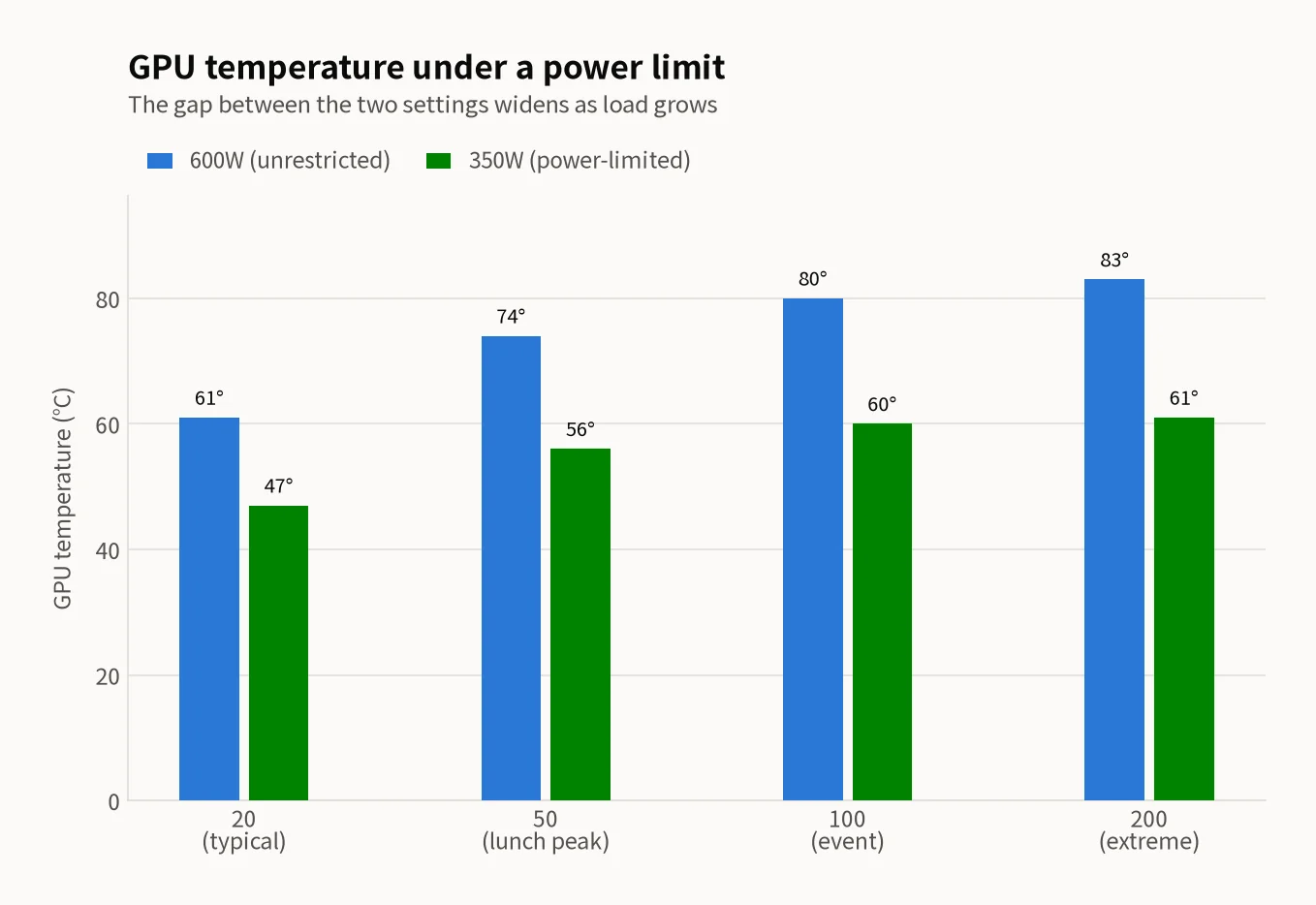
Temperature Comparison — The Core Benefit
| Scenario | 600W Temp | 350W Temp | Reduction |
|---|---|---|---|
| 20 users | 61°C | 47°C | -14°C |
| 50 users | 74°C | 56°C | -18°C |
| 100 users | 80°C | 60°C | -20°C |
| 200 users | 83°C | 61°C | -22°C |
Throughput Comparison
| Scenario | 600W tok/s | 350W tok/s | Reduction |
|---|---|---|---|
| 20 users | 650 | 565 | -13% |
| 50 users | 1,122 | 905 | -19% |
| 100 users | 1,385 | 1,059 | -24% |
| 200 users | 1,429 | 1,093 | -24% |
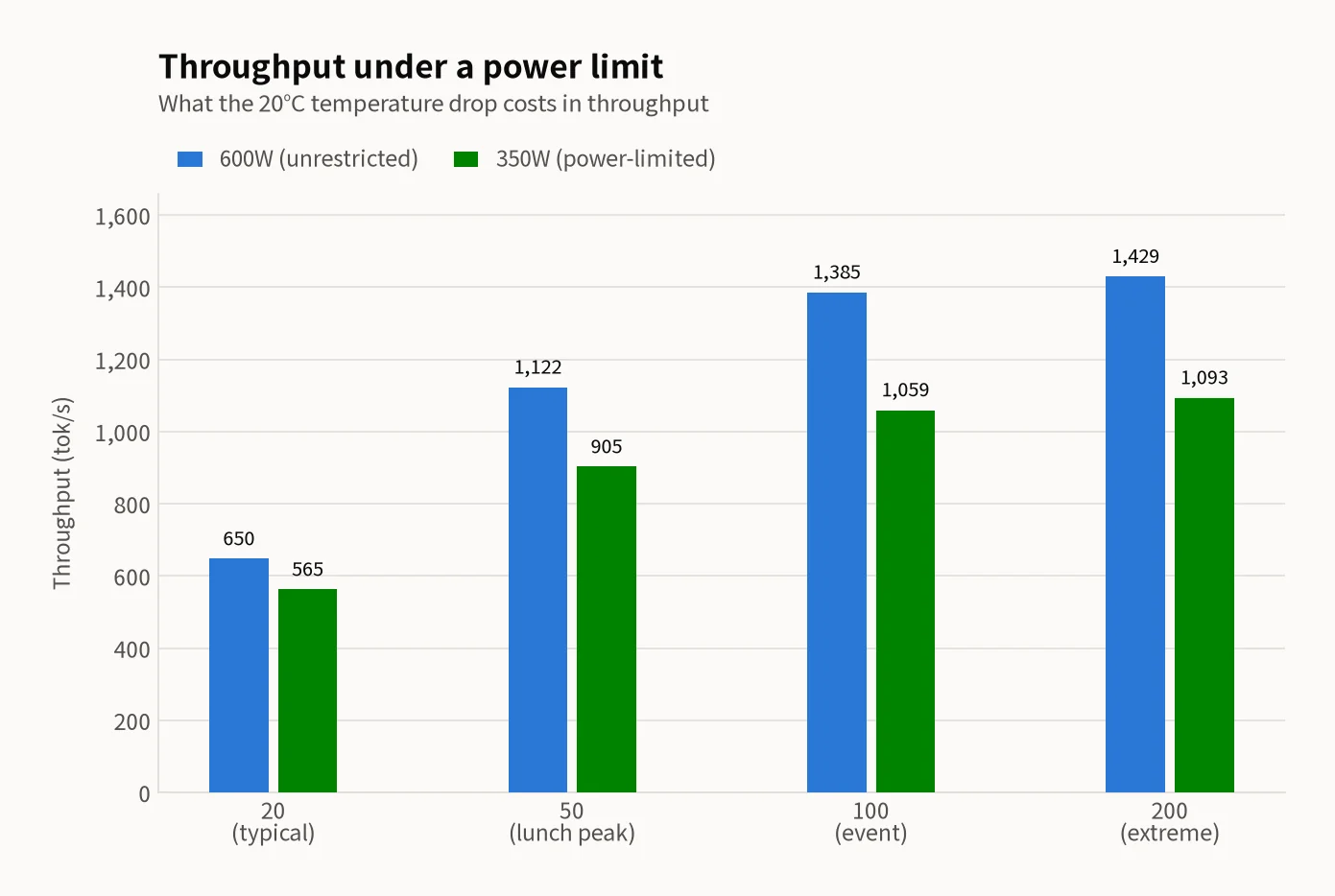
Key findings: Temperature drops dramatically — 200 users at 83°C → 61°C (-22°C). Low-load performance loss is modest (10–11%), but high-load (100+ users) sees 37–43% slowdown. Error rate remains 0% at both power settings. Even at 350W with 200 concurrent users, temperature stays at a safe 61°C.
Recommended Settings by Scenario
| Scenario | Recommended Power | Rationale |
|---|---|---|
| Daily operation (~50 users) | 350–400W | Stable temperature, ~10% performance loss, major electricity savings |
| Peak events (100+ users) | 450–500W | Balance between performance and thermal management |
| Short benchmarks / emergencies | 600W (stock) | Maximum performance, only for brief periods |
| Summer long-term operation | 350W | Thermal safety first, reduces cooling costs |
How to Apply Power Limits
# Check current power status
nvidia-smi -q -d POWER

# Set power limit (e.g., 350W)
sudo nvidia-smi -pl 350

# Restore to stock
sudo nvidia-smi -pl 600
Power limits reset on reboot. For persistent settings, add the command to a startup script or systemd service.
Summary
RTX 5090 undervolting: Token generation drops only 3.8%, prompt processing -19%. Effective for token-generation-bound workloads.
RTX PRO 6000 at 450W: Token generation drops just 1.3%, prompt processing -19%. Virtually no user-perceived impact while saving 25% power.
350W concurrent load: Low-load (≤50 users) sees ~10% performance loss with dramatic 14–22°C temperature reduction. High-load (100+ users) shows 37–43% performance loss — acceptable for off-peak operation but not for burst traffic.
The recommendation: Run at 350–400W for daily operation. The combination of lower electricity costs, dramatically reduced temperatures, extended hardware life, and minimal performance impact makes this the optimal long-term configuration.
Related Posts
© 2026 TreeRU. All rights reserved.
All content is copyrighted by TreeRU. Unauthorized reproduction without attribution is prohibited.
