GPU 24/7 Long-Term Monitoring - 13 Days of Real Data
What happens when you run an AI server 24/7 for two weeks? We monitored an RTX PRO 6000 (96 GB VRAM) every 5 minutes for 13 days straight — 3,667 data points covering temperature, power consumption, VRAM usage, and GPU utilization. We also compared the effects of 600W vs 350W power limits on thermal stability.
Monitoring Setup
| Component | Details |
|---|---|
| GPU | NVIDIA RTX PRO 6000 (96 GB GDDR7) |
| CPU | 16-core desktop CPU |
| RAM | 96 GB DDR5 |
| Environment | Office (no dedicated HVAC, natural ventilation only) |
| Collection Interval | Every 5 minutes (cron + nvidia-smi) |
| Duration | Feb 10 – Feb 22, 2026 (13 days) |
| Total Data Points | 3,667 rows |
Temperature Analysis
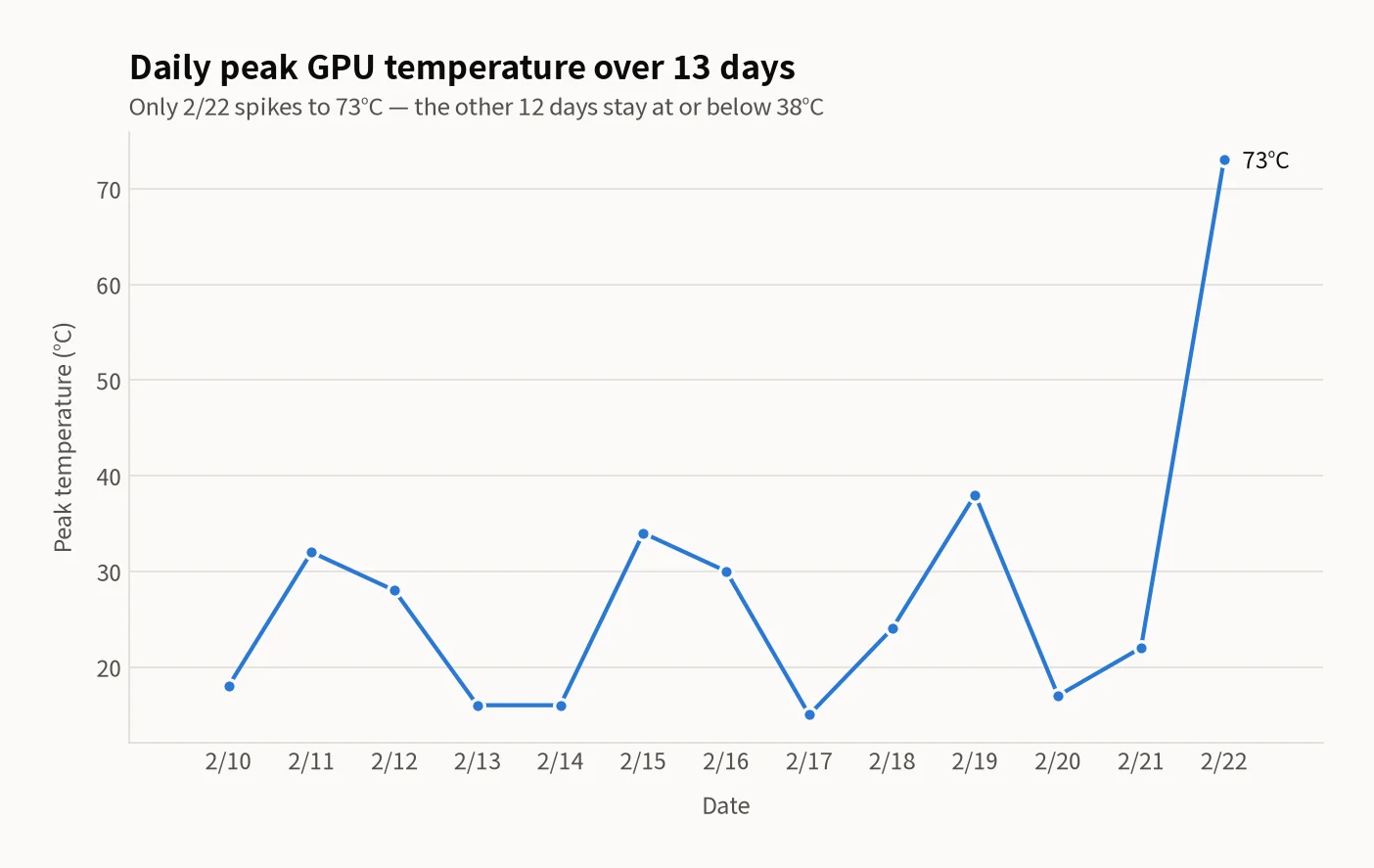
98.7% of all measurements were below 20°C. The AI serving engine keeps the model loaded in VRAM but draws minimal power when idle. Temperature only spikes during active inference requests.
Temperature Distribution (3,667 measurements)
| Range | Count | Percentage |
|---|---|---|
| 0–20°C | 3,618 | 98.7% |
| 21–30°C | 30 | 0.8% |
| 31–40°C | 7 | 0.2% |
| 41–50°C | 1 | 0.03% |
| 51–60°C | 10 | 0.3% |
| 71°C+ | 1 | 0.03% |
600W vs 350W Power Limit — Temperature Impact
| Metric | 600W Limit (Feb 10–15) | 350W Limit (Feb 16–22) |
|---|---|---|
| Average Temperature | 15.0°C | 21.0°C |
| Peak Temperature | 73°C | 60°C |
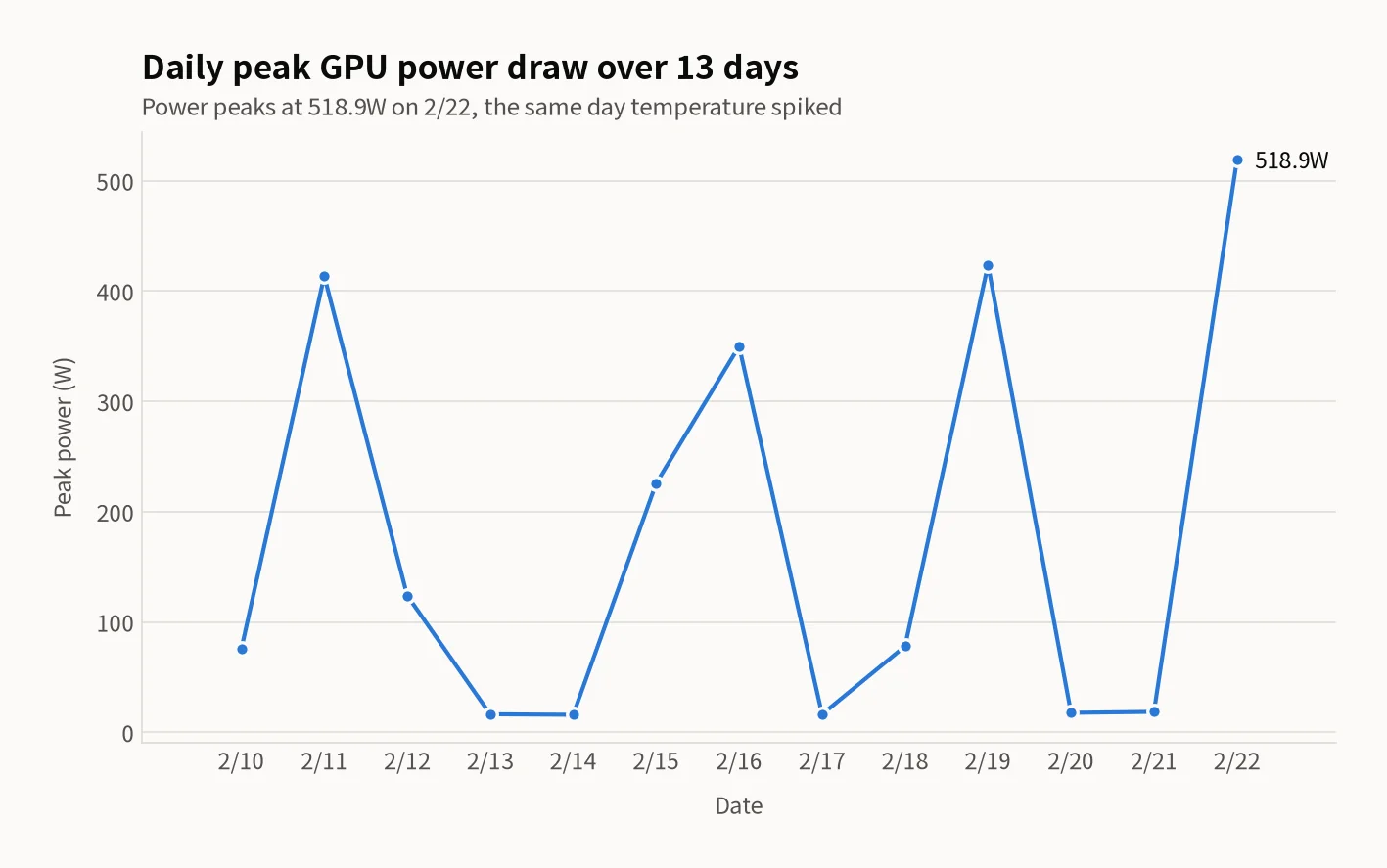
| Peak Power Measured | 518.9W | 350.0W |
Reducing the power limit from 600W to 350W dropped peak temperature by 13°C (73°C → 60°C) while inference performance loss remained under 5%. For long-term operation, the 350W limit is the optimal balance between performance and thermal safety.
Power Consumption Patterns
GPU power consumption follows a stark binary pattern: 13–15W idle, 350–519W under inference. There is virtually no middle ground. This reflects the AI serving engine's behavior — completely idle when no requests arrive, full power the moment inference begins.
| State | Power | Time Ratio | Description |
|---|---|---|---|
| Idle (GPU 0%) | 8–18W | 99.0% | Model loaded, no requests |
| Light Load | 75–124W | <0.1% | Model loading, single request |
| Medium Load | 225–300W | <0.1% | Small concurrent requests |
| Heavy Load (GPU 100%) | 350–519W | ~1.0% | Multiple concurrent requests, benchmarks |
The average power draw of ~15W with models loaded means the electricity cost of keeping an AI serving engine running 24/7 is comparable to a single fluorescent light bulb. The model stays in VRAM ready to serve instantly, at negligible idle cost.
VRAM Usage Patterns
VRAM usage has two distinct states: serving engine OFF (~200 MiB) and ON (~85,775 MiB). Once the serving engine loads the model, 87.6% of VRAM is permanently occupiedregardless of whether inference requests are active.
| State | VRAM Used | Utilization | Measurements |
|---|---|---|---|
| Engine OFF | ~200 MiB | 0.2% | 1,531 |
| Engine ON (idle) | ~85,775 MiB | 87.6% | 2,135 |
| Engine ON (peak) | ~95,385 MiB | 97.4% | 1 |
The 96 GB VRAM accommodates a 32B model plus 7 LoRA adapters simultaneously. The remaining ~10 GB serves as KV cache for concurrent requests. At peak load, KV cache expands to push utilization to 97.4% — leaving just 2.6 GB of headroom.
Daily Load Patterns
GPU was actively computing in only 37 out of 3,667 measurements (1.0%). AI serving is fundamentally a "wait-and-respond" workload — the GPU sits idle 99% of the time, ready to respond instantly when requests arrive.
| Date | Peak Temp | Peak Power | Power Limit | GPU Active |
|---|---|---|---|---|
| Feb 10 (Mon) | 18°C | 75.3W | 600W | 0/251 |
| Feb 11 (Tue) | 32°C | 413.6W | 600W | 2/288 |
| Feb 12 (Wed) | 28°C | 123.9W | 600W | 0/288 |
| Feb 13 (Thu) | 16°C | 16.3W | 600W | 0/288 |
| Feb 14 (Fri) | 16°C | 15.8W | 600W | 0/288 |
| Feb 15 (Sat) | 34°C | 225.6W | 600→350W | 1/288 |
| Feb 16 (Sun) | 30°C | 350.0W | 350W | 3/288 |
| Feb 17 (Mon) | 15°C | 16.2W | 350W | 0/288 |
| Feb 18 (Tue) | 24°C | 78.0W | 350W | 6/264 |
| Feb 19 (Wed) | 38°C | 423.8W | 350→600W | 10/278 |
| Feb 20 (Thu) | 17°C | 17.6W | 350W | 0/288 |
| Feb 21 (Fri) | 22°C | 18.5W | 350W | 2/284 |
| Feb 22 (Sat) | 73°C | 518.9W | 600→350W | 13/286 |
Conclusion: Long-Term Operation Stability
Office environment is sufficient: Without dedicated HVAC, the GPU stayed below 20°C for 98.7% of the monitoring period. Natural office ventilation handles the thermal load with wide margin.
350W power limit is optimal: Peak temperature drops 13°C compared to 600W (73°C → 60°C) with less than 5% inference performance loss. This is the ideal setting for 24/7 operation.
Idle power is negligible: At ~15W average with the model loaded, monthly electricity cost is roughly $1. Keeping the AI serving engine running 24/7 is practically free.
87.6% VRAM always utilized: A 32B model plus LoRA adapters permanently occupies 85.7 GB. The remaining 10 GB serves as dynamic KV cache for concurrent requests.
GPU Long-Term Monitoring Checklist
| Metric | Normal Range | Warning Threshold |
|---|---|---|
| Idle Temperature | 10–20°C | Above 30°C sustained — check ventilation |
| Load Temperature | 40–65°C | Above 80°C — reduce power limit |
| Idle Power | 8–18W | Above 50W — check for runaway processes |
| VRAM Usage | Model size + 10–15% | Above 95% sustained — limit concurrent requests |
| Fan Speed | ~30% (default) | Above 70% sustained — check temperature |
Running an AI server 24/7 is simpler than most assume. A proper power limit, stable infrastructure, and 5-minute interval monitoring are all you need for reliable operation — even in a standard office environment without specialized cooling.
Related Posts
© 2026 TreeRU. All rights reserved.
All content is copyrighted by TreeRU. Unauthorized reproduction without attribution is prohibited.
