AI Image Generation API Price Comparison 2026 - Automating Blog Thumbnails with GPT Image, Gemini, FLUX & DALL-E
I spent a year automating blog thumbnails with AI image generation APIs. The images looked great — until I noticed random, meaningless text baked into half of them. Here is a hands-on breakdown of six models, their real costs, and the OCR safeguard pipeline that finally solved the problem.
$0.009
Lowest (GPT Image Low)
$0.045
Highest (Gemini 3.1 Flash)
6
Models Compared
OCR
Text Detection Safeguard
The Hidden Problem with AI-Generated Thumbnails
The pipeline was straightforward: feed the article title and category into an image generation API, get a thumbnail back, and attach it to the post automatically. It worked surprisingly well at first: vibrant, on-topic images with zero manual effort.
Then I scrolled through a batch of published posts and spotted something odd. Scattered across the generated images were fragments of text — pseudo-English words stamped onto signs, labels, and logos that had no business being there. Words like "SEER" or "TECH" embedded in what was supposed to be a clean abstract background.
Adding "NO TEXT" to the prompt did not reliably fix it. Some models ignored the instruction entirely, inserting gibberish text 30–50% of the time regardless of how forcefully the prompt demanded otherwise. DALL-E 3 was the worst offender: it does not even support negative prompts, so there was no secondary lever to pull.
Why "NO TEXT" Prompts Fail — And Which Models Actually Respect Them
I tested multiple prompt engineering strategies across all six models. The variations ranged from simple ("no text in the image") to aggressive ("ABSOLUTELY NO text, letters, words, or numbers anywhere in the frame") to using dedicated negative prompt fields where supported.
# Prompt strategies tested
# Strategy 1: Simple instruction
"...NO TEXT in the image..."

# Strategy 2: Aggressive emphasis
"...ABSOLUTELY NO text, letters, words, or numbers..."

# Strategy 3: Negative prompt (not supported by DALL-E 3)
negative_prompt = "text, letters, words, numbers, signs, labels"

# Result: Model-dependent. Some ignore it entirely.
The key finding was that prompt engineering alone cannot guarantee text-free output. Model architecture matters far more than prompt wording. GPT Image 1.5 (both Low and Medium tiers) showed the highest compliance, with nearly zero unwanted text across hundreds of generations. FLUX 1.1 Pro was also reliable. DALL-E 3, on the other hand, embedded text in roughly 40% of outputs even with the most aggressive suppression prompts.
This is not just an aesthetic issue. Thumbnails with random text look unprofessional and can confuse readers scanning a blog index page. For content-heavy sites publishing dozens of posts per month, manually checking every thumbnail defeats the purpose of automation.
Building an OCR Safeguard Pipeline with Tesseract
Since no prompt can guarantee a text-free image 100% of the time, I added a post-generation verification step. The idea is simple: run OCR on every generated image, and if text is detected, regenerate it automatically.
thumbnail_generator.py — OCR safeguard
import pytesseract
from PIL import Image
import io

def has_text_in_image(image_bytes: bytes, threshold: int = 3) -> bool:
    """Detect text in image. Returns True if >= threshold chars found."""
    try:
        img = Image.open(io.BytesIO(image_bytes))
        text = pytesseract.image_to_string(img)
        cleaned = ''.join(text.split())
        return len(cleaned) >= threshold
    except Exception:
        return False  # Pass if Tesseract not installed

def generate_thumbnail(prompt: str, max_retries: int = 3) -> bytes:
    for attempt in range(max_retries):
        image_bytes = call_image_api(prompt)

        if not has_text_in_image(image_bytes):
            return image_bytes

        print(f"Text detected, regenerating ({attempt+1}/{max_retries})")

    return image_bytes  # Return last attempt after max retries
The threshold of 3 characters works well in practice. Single-character OCR false positives (a curved line misread as "l" or "I") get filtered out, while actual embedded text (which typically runs 4+ characters) triggers regeneration. With up to 3 retries, the pipeline catches over 95% of text artifacts even on models with lower NO TEXT compliance.
One caveat: Tesseract must be installed in the runtime environment. For Docker deployments, add apk add tesseract-ocr (Alpine) or apt-get install tesseract-ocr (Debian/Ubuntu) to the Dockerfile. Without it, the safeguard silently passes all images through — fine for development, but you lose the safety net in production.
Price Comparison: 6 Models at 1024×1024 (March 2026)
Here is the real-world pricing breakdown based on actual API calls over the past year. All prices are per image at 1024×1024 resolution, as of March 2026.
| Model | Price / Image | NO TEXT Reliability | Notes |
|---|---|---|---|
| GPT Image 1.5 Low | $0.009 | Very High | Best cost-performance |
| GPT Image 1.5 Medium | $0.034 | Very High | Higher detail output |
| Gemini 3.1 Flash | $0.045 | Good | Latest version |
| FLUX 1.1 Pro | $0.040 | High | Via Replicate API |
| Gemini 2.5 Flash | $0.039 | Moderate | EOL Oct 2026 |
| DALL-E 3 | $0.040 | Low | Deprecated, not recommended |
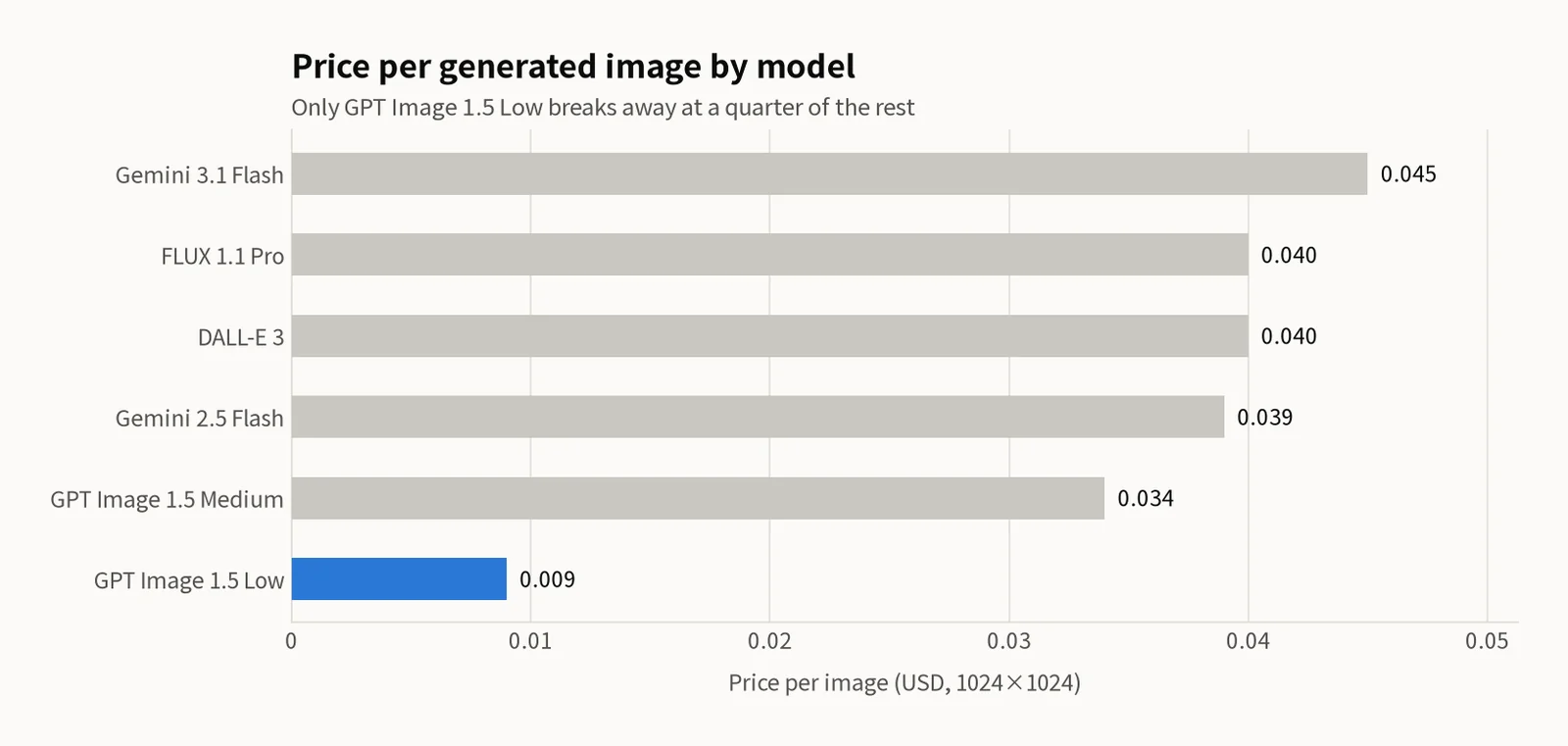
At 100 images per month, GPT Image 1.5 Low costs roughly $0.90, compared to $4.00 for FLUX 1.1 Pro or DALL-E 3. That is a 4.4x price gap, and the cheapest option also happens to have the best text suppression. At 1,000 images per month (realistic for a multi-site content operation), the difference balloons to $9 versus $40.
Gemini 2.5 Flash deserves a special note: it is scheduled for end-of-life in October 2026. If you are currently using it, plan to migrate to Gemini 3.1 Flash before that deadline. The pricing is slightly higher ($0.045 vs $0.039), but the NO TEXT reliability improved noticeably in the newer version.
Recommendations by Use Case
Blog Thumbnail Automation (Best Value)
GPT Image 1.5 Low is the clear winner. At $0.009 per image with very high NO TEXT compliance, it is purpose-built for high-volume, automated thumbnail generation. Pair it with the OCR safeguard for near-perfect results.
High-Quality Marketing Assets
GPT Image 1.5 Medium or FLUX 1.1 Pro. When you need finer detail or more stylistic control (FLUX excels at artistic styles), the higher per-image cost is justified. FLUX is available through the Replicate API, which offers a straightforward pay-per-generation model with no subscription commitment.
Bulk Generation (Cost is Everything)
GPT Image 1.5 Low + OCR safeguard. The cheapest model combined with automated quality control gives you the lowest per-image cost while maintaining a professional standard. Even with occasional regenerations due to text detection, the effective cost per usable image stays well under $0.015.
Models to Avoid
DALL-E 3 is deprecated and has the worst text artifact rate among all tested models. If you are still using it, migrate to GPT Image 1.5 immediately; it is both cheaper and more reliable. Gemini 2.5 Flash still works but has a fixed EOL date; do not build new pipelines on it.
Conclusion
The AI image generation API landscape in 2026 is dominated by a clear value leader: GPT Image 1.5 Low delivers the best combination of price ($0.009/image), text suppression reliability, and output quality for automated workflows. The biggest lesson from a year of production use is that prompt engineering alone cannot eliminate unwanted text — you need an OCR verification layer as a safety net.
For teams running content automation at scale, the recommended stack is GPT Image 1.5 Low for generation, Tesseract OCR for post-generation text detection, and a retry loop capped at 3 attempts. This combination keeps costs under $1 per 100 images while maintaining a clean, professional output standard that requires no manual review.
Related Posts
© 2026 TreeRU. All rights reserved.
All content is copyrighted by TreeRU. Unauthorized reproduction without attribution is prohibited.
