Python Startup From 78s to 20s - Finding Bottlenecks With Log Timelines
We had a Python automation tool running on a low-power mini PC that took 78 seconds to start. Every restart meant staring at a loading screen for over a minute. After adding timestamps to the logs and building a startup timeline, the bottlenecks became immediately obvious. We cut 58 seconds and brought startup under 20 seconds.
78s
Before optimization
~20s
After optimization
58s
Time saved
4
Issues fixed
78-Second Startup on a Low-Power Mini PC
This program restarts automatically multiple times a day—on errors, scheduled reboots, and nightly maintenance. Each restart triggered a 78-second loading screen. That’s 3–5 times per day watching a spinner for over a minute.
A low-power mini PC processor is significantly slower than server-grade CPUs. But 78 seconds was excessive even for that hardware. That kind of delay points to I/O-bound operations—most likely network requests.
Before: No Visibility
The existing logs only showed "Initializing... Loading... Done" with no timestamps. There was no way to tell where time was being spent. Step one was fixing the logs.
Building a Log Timeline to Find Bottlenecks
We added elapsed-time timestamps at every major initialization step: function entry/exit, external API calls, and module loads.
# Timestamp logging pattern
import time
import logging

class TimedLogger:
    def __init__(self):
        self.start = time.time()

    def log(self, msg: str):
        elapsed = time.time() - self.start
        logging.info(f"[{elapsed:.2f}s] {msg}")

# Usage
timer = TimedLogger()
timer.log("Initialization started")

# ... auto login ...
timer.log("Auto login complete")

# ... GitHub API calls ...
timer.log("Banner data loaded")

# ... other init ...
timer.log("Ready")
# Actual log output (before optimization)
[0.00s] Initialization started
[0.12s] DB connection established
[3.45s] Config file loaded
[13.52s] Auto login complete          ← 10 seconds
[56.89s] Banner data loaded           ← 43 seconds!!
[66.91s] Heartbeat tracker started
[76.93s] Auto-start wait complete     ← 10 seconds
[77.01s] Ready                        ← 77 seconds total
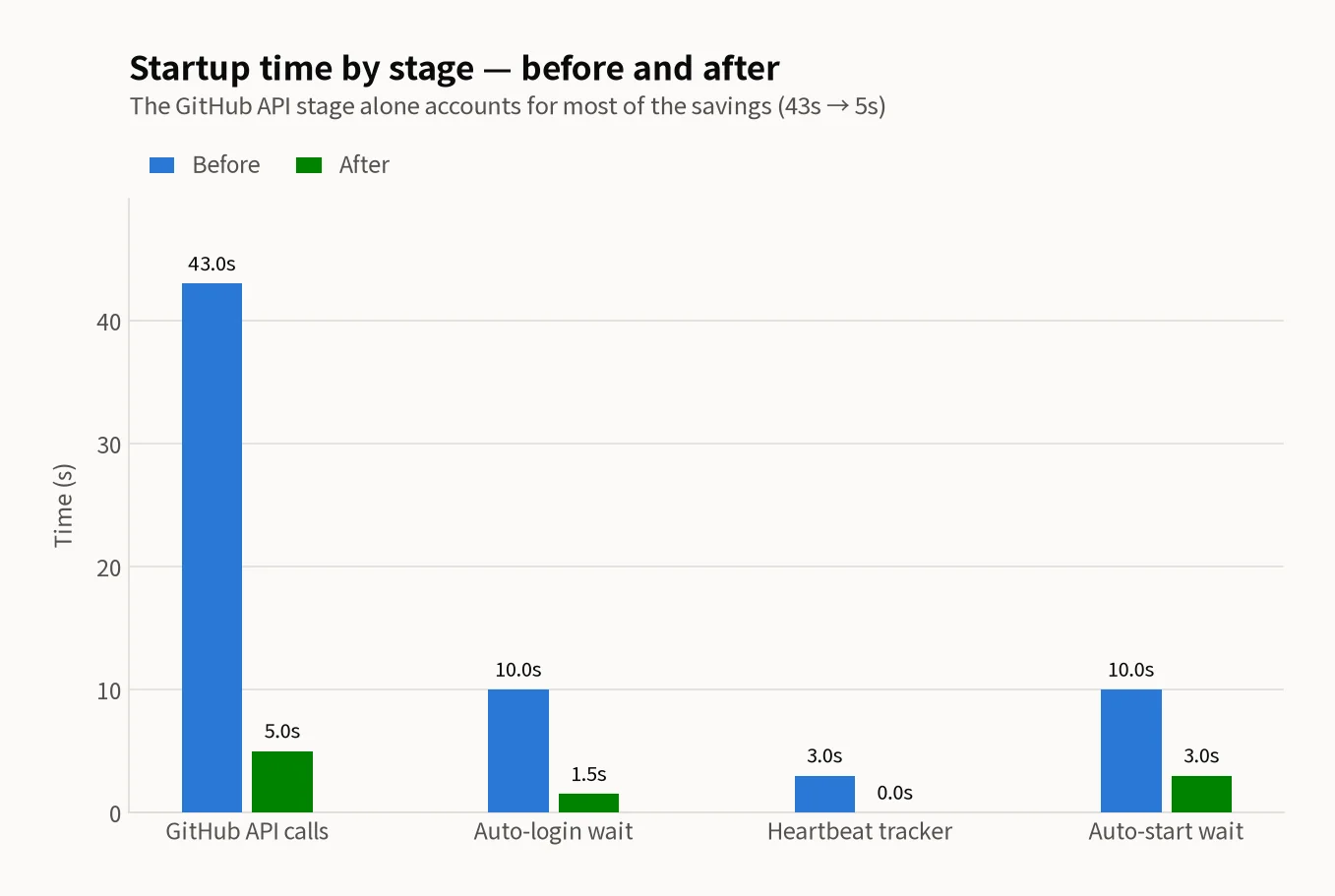
The timeline made everything obvious. Banner data loading took 43 seconds—55% of the total 78-second startup.
Bottleneck 1: GitHub API Calls — 44 Down to 5 (43s Saved)
The "banner data" turned out to be a function that fetched file contents from a GitHub repository. The problem: it made 44 individual API calls, one per file. At roughly 1 second per request, that’s 44 seconds. The math checked out perfectly.
# Before — 44 individual API calls
# Individual API call per file
for banner_id in banner_ids:  # 44 items
    response = github_api.get_content(
        repo="my-org/banners",
        path=f"banners/{banner_id}.json"
    )
    banners.append(parse_banner(response))
# After — directory listing + pattern matching
# 1. Fetch entire directory listing at once (1 API call)
all_files = github_api.get_contents(
    repo="my-org/banners",
    path="banners/"
)

# 2. Filter by pattern locally (0 API calls)
target_files = [
    f for f in all_files
    if f.name.startswith("banner_") and f.name.endswith(".json")
    and extract_id(f.name) in banner_ids
]

# 3. Fetch only the files we need (~5 API calls)
for f in target_files[:5]:  # Top 5 only
    content = github_api.get_content(repo="my-org/banners", path=f.path)
    banners.append(parse_banner(content))
Saved: ~43 seconds
API calls dropped from 44 to about 5, eliminating 43 seconds. It turned out the code didn’t even need all 44 files—only the 5 most recent ones were ever used. Accumulated tech debt at its finest.
Bottleneck 2: Login Wait — 10s Down to ~1.5s (8s Saved)
After clicking the login button, the code had a hard-coded time.sleep(10). Someone had decided "10 seconds should be enough" and never revisited it.
# Before — fixed 10-second sleep
login_button.click()
time.sleep(10)  # Wait 10 seconds
# After — event-driven wait with 3s timeout
login_button.click()

# Detect actual login completion (URL change or element appears)
WebDriverWait(driver, timeout=3).until(
    lambda d: "login" not in d.current_url
             or EC.presence_of_element_located((By.ID, "user-menu"))(d)
)
# Moves on immediately when done. Max wait: 3 seconds
Login actually completed in 1–2 seconds most of the time. Switching to WebDriverWait cut the average to 1.5 seconds with a 3-second cap.
Bottleneck 3: Dead Features Disabled (8s Saved)
The log timeline revealed two more time sinks from features that were no longer in use.
Heartbeat Tracker — Fully Disabled (~3s)
A heartbeat feature was trying to ping an external server that no longer existed. It attempted a connection on every startup and waited for a timeout. Disabling it entirely removed the wasted connection attempt.
Auto-Start Delay — 10s Down to 3s (~7s)
After initialization, the program waited 10 seconds before starting work, presumably to "give the user a chance to cancel." But this runs unattended on a server—no one is watching. We shortened it to 3 seconds.
Result: 78s → 20s
| Issue | Before | After | Saved |
|---|---|---|---|
| GitHub API calls | 44 calls (~43s) | ~5 calls (~5s) | ~38s |
| Auto login wait | Fixed 10s | Avg 1.5s | ~8s |
| Heartbeat tracker | Timeout (~3s) | Disabled (0s) | ~3s |
| Auto-start delay | Fixed 10s | 3s | 7s |
| Total | ~78s | ~20s | ~58s |
Key Takeaway
The first step of performance optimization is measurement. Before touching any code based on gut feeling, build a log timeline to find the exact bottlenecks. In this case, 55% of total startup time came from a single function, and the fix was simply reducing the number of API calls.
Optimization Checklist
Python Startup Speed Optimization Essentials
- ✓Build a log timeline first to identify exactly where time is spent
- ✓Minimize repeated API calls at startup — use directory listing + pattern matching
- ✓Replace time.sleep() with event-driven waits (WebDriverWait, polling)
- ✓Disable unused features (dead heartbeats, orphaned initializations)
- ✓On low-power hardware, I/O bottleneck optimization has outsized impact
This article is based on real-world experience from March 2026. Performance numbers may vary depending on hardware and environment. Non-commercial sharing is welcome. For commercial use, please reach out via our contact page.
Need Help With Python Automation Performance?
From startup optimization to API call efficiency and bottleneck analysis, we deliver practical improvements based on real production environments.
Request a ConsultationRelated Posts
© 2026 TreeRU. All rights reserved.
All content is copyrighted by TreeRU. Unauthorized reproduction without attribution is prohibited.
