CPU Embedding Benchmark Tool: Automated Performance Comparison Across 8 CPUs
Embeddings are a core computation in RAG systems and search engines. When running embeddings on CPU without a GPU, how much does CPU choice matter?We built a Python benchmark tool and tested 8 CPUs across 3 embedding models to find out.
8
CPUs Tested
3
Embedding Models
~7x
Max Performance Gap
JSON
Output Format
Benchmark Design
For a fair comparison, we standardized all test conditions: same text dataset, same embedding models, same Python environment across every CPU.
Test Conditions
| Embedding Model | Parameters | Dimensions | Characteristics |
|---|---|---|---|
| all-MiniLM-L6-v2 | 22M | 384 | Lightweight, fastest |
| bge-base-en-v1.5 | 109M | 768 | Balanced performance |
| multilingual-e5-large | 560M | 1024 | Multilingual, highest quality |
Why CPU Embeddings?
Not every environment has a GPU. Edge servers, low-power mini PCs, and cloud CPU instances often need to handle embeddings without GPU acceleration. Knowing how much performance CPUs actually deliver is the starting point for infrastructure planning.
Python Benchmark Script
The script uses sentence-transformers to simulate real embedding workloads. Model loading, warmup, and measurement are separated to capture pure inference speed.
# cpu_embedding_bench.py
import os, time, json, platform
from sentence_transformers import SentenceTransformer

MODELS = [
    "all-MiniLM-L6-v2",
    "BAAI/bge-base-en-v1.5",
    "intfloat/multilingual-e5-large",
]

sentences = [
    f"This is test sentence number {i} for "
    f"embedding benchmark."
    for i in range(1000)
]

def benchmark_model(model_name, batch_size=32, runs=3):
    model = SentenceTransformer(model_name)
    model.encode(sentences[:10], batch_size=batch_size)  # warmup

    times = []
    for _ in range(runs):
        start = time.perf_counter()
        model.encode(sentences, batch_size=batch_size)
        elapsed = time.perf_counter() - start
        times.append(elapsed)

    median_time = sorted(times)[len(times) // 2]
    return {
        "model": model_name,
        "median_seconds": round(median_time, 2),
        "sentences_per_sec": round(len(sentences) / median_time, 1),
    }

results = {
    "cpu": platform.processor(),
    "cores": os.cpu_count(),
    "benchmarks": [benchmark_model(m) for m in MODELS],
}
print(json.dumps(results, indent=2))
# Running the benchmark
pip install sentence-transformers torch

# Run and save results
python cpu_embedding_bench.py > results.json

# Limit to specific core count
OMP_NUM_THREADS=4 python cpu_embedding_bench.py
Control core count with OMP_NUM_THREADS
PyTorch uses all available CPU cores by default. Setting OMP_NUM_THREADS=4 lets you measure performance at a specific core count — useful when sharing CPU resources with other workloads.
8-CPU Benchmark Results
We tested CPUs spanning desktops, laptops, mini PCs, and servers. All results below use all-MiniLM-L6-v2 (the lightweight model) as the baseline comparison.
| Configuration | Cores/Threads | Sent/s | Relative |
|---|---|---|---|
| Desktop A | 16C/32T | 847.3 | 100% |
| Desktop B | 16C/32T | 782.1 | 92% |
| Workstation | 24C/32T | 725.6 | 86% |
| Mobile APU | 8C/16T | 489.2 | 58% |
| Desktop C | 8C/16T | 421.5 | 50% |
| Mini PC A | 12C/16T | 356.8 | 42% |
| Laptop | 6C/12T | 218.4 | 26% |
| Mini PC B | 4C/4T | 123.7 | 15% |
Top Speed
847.3
sent/s (16-core desktop)
Max Gap
6.85x
16-core vs 4-core
4-core mini PC for 1,000 sent
8.1s
Practically usable
The low-power mini PC is surprisingly capable
Even the slowest 4-core mini PC processes 123.7 sentences per second. Embedding 1,000 sentences in about 8 seconds is perfectly practical for small-scale RAG systems — and at just 6W TDP, power costs are negligible.
SSH Remote Execution
With multiple servers, logging into each one individually is inefficient. With SSH key authentication set up, a shell script can run the benchmark across all machines and collect results automatically.
# remote-bench.sh — run benchmarks on multiple servers
#!/bin/bash
SERVERS=("server-a" "server-b" "server-c" "minipc-a")
SCRIPT_PATH="/opt/bench/cpu_embedding_bench.py"
OUTPUT_DIR="./results"

mkdir -p "$OUTPUT_DIR"

for server in "${SERVERS[@]}"; do
  echo "[$server] Starting benchmark..."
  ssh "$server" "python3 $SCRIPT_PATH" \
    > "$OUTPUT_DIR/$server.json" 2>/dev/null

  if [ $? -eq 0 ]; then
    echo "[$server] Complete"
  else
    echo "[$server] Failed"
  fi
done
echo "All benchmarks complete. Results: $OUTPUT_DIR/"
Prerequisites
First run may be slow
sentence-transformers downloads models on first execution. Run the script manually once on each server before remote batch execution to cache the models locally.
JSON Output and Merging
JSON output makes post-processing and visualization straightforward. Here is a merge script that combines results from multiple servers into a ranked comparison.
# Single server output example (server-a.json)
{
  "cpu": "16-core desktop CPU",
  "cores": 32,
  "benchmarks": [
    { "model": "all-MiniLM-L6-v2",
      "median_seconds": 1.18,
      "sentences_per_sec": 847.3 },
    { "model": "BAAI/bge-base-en-v1.5",
      "median_seconds": 3.42,
      "sentences_per_sec": 292.4 },
    { "model": "intfloat/multilingual-e5-large",
      "median_seconds": 8.75,
      "sentences_per_sec": 114.3 }
  ]
}
# merge_results.py — combine multi-server results
import json, glob

results = []
for path in sorted(glob.glob("results/*.json")):
    with open(path) as f:
        data = json.load(f)
        data["server"] = path.split("/")[-1].replace(".json", "")
        results.append(data)

for model_idx in range(len(results[0]["benchmarks"])):
    model_name = results[0]["benchmarks"][model_idx]["model"]
    print(f"\n=== {model_name} ===")
    ranked = sorted(
        results,
        key=lambda r: r["benchmarks"][model_idx]["sentences_per_sec"],
        reverse=True,
    )
    for r in ranked:
        bench = r["benchmarks"][model_idx]
        print(f"  {r['cpu']:30s}  {bench['sentences_per_sec']:8.1f} sent/s")
Why JSON?
JSON is parseable in any language — Python, JavaScript, Go, Rust. Feed it directly into visualization tools (matplotlib, Chart.js) or store in databases for historical tracking.
Full Comparison Table
All 8 CPUs across all 3 models at a glance. Units are sentences per second (sent/s).
| Configuration | MiniLM (light) | BGE-base (mid) | E5-large (heavy) | TDP |
|---|---|---|---|---|
| 16-core desktop A | 847.3 | 292.4 | 114.3 | 170W |
| 16-core desktop B | 782.1 | 268.5 | 105.7 | 170W |
| 24-core workstation | 725.6 | 251.8 | 98.2 | 253W |
| 8-core mobile APU | 489.2 | 170.3 | 66.8 | 54W |
| 8-core desktop | 421.5 | 146.2 | 57.1 | 65W |
| 12-core mini PC | 356.8 | 123.5 | 48.3 | 28W |
| 6-core laptop | 218.4 | 75.6 | 29.5 | 15W |
| 4-core mini PC | 123.7 | 42.8 | 16.7 | 6W |
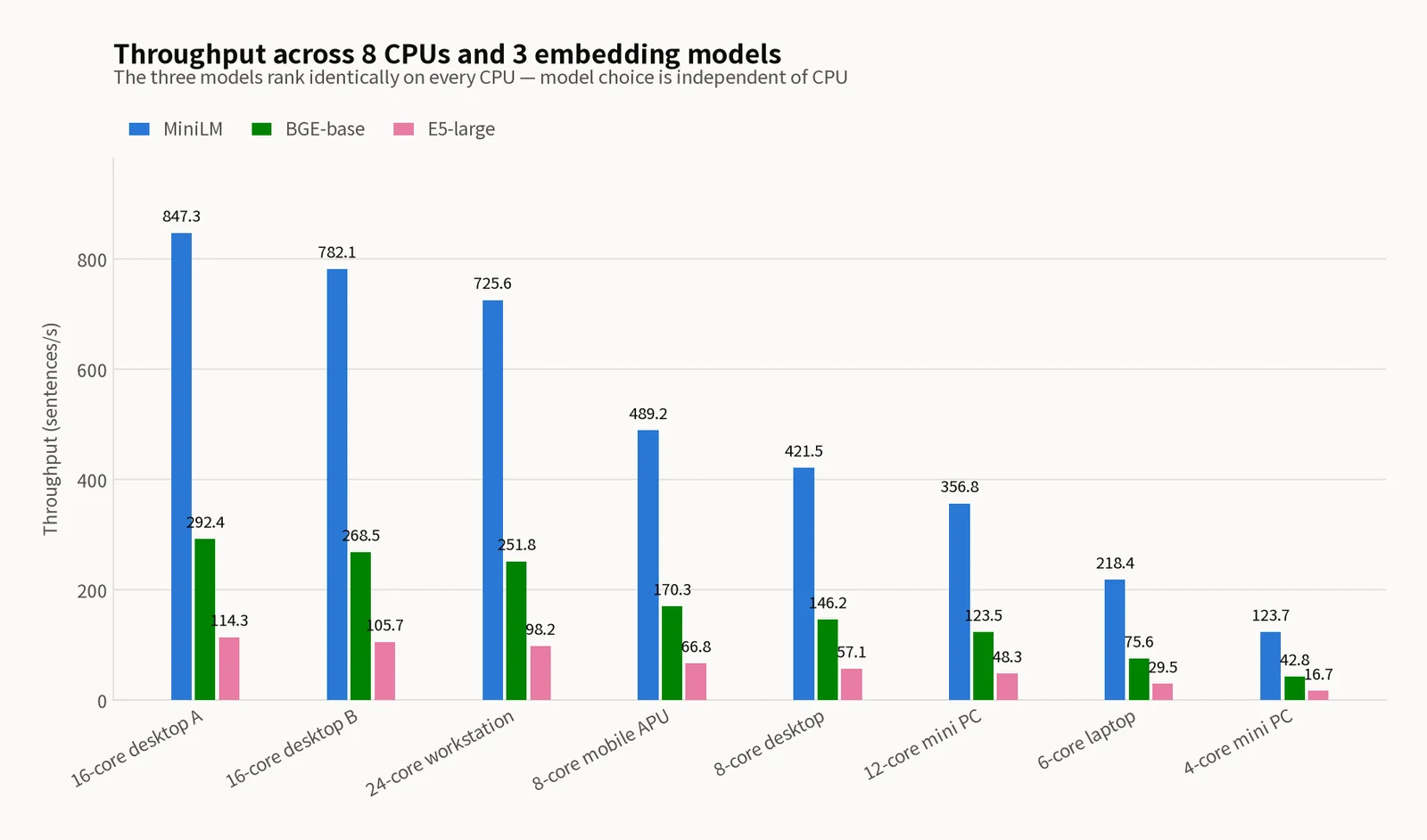
CPU Recommendations by Use Case
High-throughput embedding server
High-core-count desktop CPU: high core count and cache for maximum throughput
Best cost-to-performance
8-core-class CPU: half the price with over half the performance, sufficient for mid-scale services
Low-power edge deployment
4-core mini PC: 6W TDP for negligible power costs, viable for small-scale RAG systems
Mobile CPUs lead in performance-per-watt
Raw speed favors desktop CPUs, but in sentences/sec/watt, an 8-core mobile CPU (9.1 sent/s/W) beats a 16-core desktop (5.0 sent/s/W) by over 80%. When electricity costs matter, mobile CPUs are the rational choice.
Key Takeaways
- ✓Python + sentence-transformers automates CPU embedding benchmarks
- ✓8 CPUs tested: top (16-core) at 847.3 sent/s, bottom (4-core) at 123.7 sent/s
- ✓6.85x max performance gap — CPU choice directly impacts embedding throughput
- ✓SSH remote execution collects multi-server benchmarks in one pass
- ✓JSON output enables easy post-processing and visualization
- ✓Per-watt efficiency: mobile CPU (8-core) beats desktop (16-core) by 80%
This article was written as of February 2026. Benchmark results may vary depending on OS settings, BIOS version, memory speed, and ambient temperature. Server names are pseudonyms unrelated to actual environments. CPU prices and TDP values are official specs at time of publication; actual power consumption may differ. Non-commercial sharing is welcome. For commercial use, please reach out via our contact page.
Related Posts
© 2026 TreeRU. All rights reserved.
All content is copyrighted by TreeRU. Unauthorized reproduction without attribution is prohibited.
