Image Optimization Alone Boosted PageSpeed by 20 Points - 36MB to 0.8MB
What's the single most impactful thing you can do for web performance? Code splitting? Caching? Neither. Image compression. It's the easiest, highest-impact, lowest-risk optimization available. We compressed 6 images from 36MB to 0.8MB(97.8% reduction) using sharp, optimized loading strategies, and gained 28 points on Desktop PageSpeed. LCP dropped from 110 seconds to 6.8 seconds.
The Problem: 6 Images, 36MB Total
The site used 6 images total. They'd been converted to WebP from high-resolution originals during design, but at the original resolution with default compression settings.
| Image | Usage | File Size | Resolution |
|---|---|---|---|
| Hero Main | Full-screen hero | 5.6MB | 1856x2304 |
| Service (AI) | Service card | 5.3MB | 1920x1434 |
| Service (Network) | Service card | 6.6MB | 1920x1434 |
| Service (Software) | Service card | 5.9MB | 1920x1434 |
| Background Texture | Section background | 6.0MB | 1920x1072 |
| Background Photo | CTA background | 6.1MB | 1920x1072 |
| Total | 35.5MB |
Google PageSpeed Insights simulates Mobile as Moto G Power + slow 4G (1.6 Mbps). Downloading 36MB at that speed takes approximately 180 seconds. An LCP measurement of 110 seconds was the inevitable result.
Here's the critical insight: a 5MB WebP and a 100KB WebP look identical on most monitors. At web resolutions (1920px and below), quality 80 and quality 100 are visually indistinguishable. Bigger file size does not mean better quality for the user.
Compression with sharp: The Fastest Node.js Image Library
sharp is the fastest image processing library for Node.js, built on libvips. It's faster than Photoshop or online tools and fully scriptable for automation.
npm install sharp --save-dev

// Single image compression
const sharp = require('sharp');

// WebP — general images
await sharp('input.webp')
  .resize(1920)            // Width-based resize
  .webp({ quality: 80 })   // Quality 80 is sufficient
  .toFile('output.webp');

// AVIF — Hero image (aggressive compression)
await sharp('hero.webp')
  .resize(900)             // Mobile-first width
  .avif({ quality: 40, effort: 6 })
.toFile('hero.avif');| Usage | Format | Max Width | Quality | Notes |
|---|---|---|---|---|
| Hero (LCP image) | AVIF | ~900px | 35–50 | Most aggressive compression |
| Service cards | WebP | ~600px | 40–50 | Apply lazy loading |
| Background texture | WebP | ~1200px | 30–40 | Detail less critical |
| Background photo | WebP | ~1200px | 40–50 | Apply lazy loading |
Compression Results
| Image | Before | After | Reduction |
|---|---|---|---|
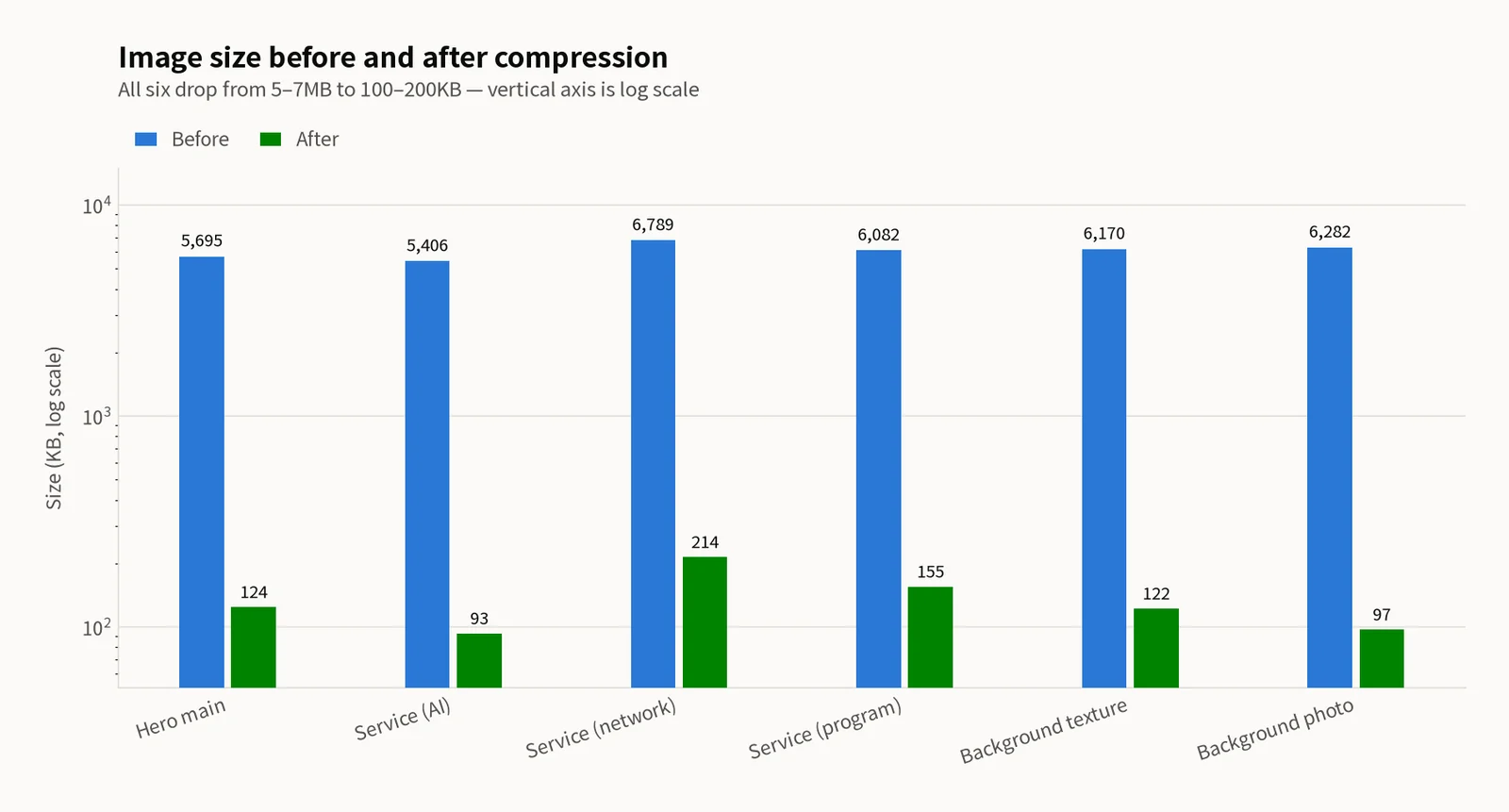
| Hero Main | 5,695KB | 124KB | 97.8% |
| Service (AI) | 5,406KB | 93KB | 98.3% |
| Service (Network) | 6,789KB | 214KB | 96.8% |
| Service (Software) | 6,082KB | 155KB | 97.5% |
| Background Texture | 6,170KB | 122KB | 98.0% |
| Background Photo | 6,282KB | 97KB | 98.5% |
| Total | 35.5MB | 0.8MB | 97.8% |
WebP vs AVIF: When to Use Which
Both formats are supported by modern browsers, but the choice depends on the use case.
| Attribute | WebP | AVIF |
|---|---|---|
| Compression ratio | Good | Excellent (40–60% smaller) |
| Encoding speed | Fast | Slow (~6x slower) |
| Decoding speed | Fast | Slightly slower |
| Browser support | 96%+ | 92%+ |
| Quality (same size) | Good | Better |
Use AVIF for the Hero image (LCP). It's a single image, so encoding time is negligible, and the file size difference directly impacts LCP. Use WebP for everything else — it's sufficient quality with faster encoding. When processing dozens of images, AVIF encoding time becomes a real build-time concern.
Loading Strategy: fetchPriority and lazy loading
Compression alone isn't enough. You need to tell the browser which images to load first.
Above the fold (Hero image):
<img
  src="/images/hero.avif"
  alt="description"
  width={900}
  height={1118}
  fetchPriority="high"
/>
Use fetchPriority="high" for highest-priority loading. Always specify width and height to reserve layout space. Never add loading="lazy" to the Hero image.
Below the fold (cards, backgrounds):
<img
  src="/images/card.webp"
  alt="description"
  width={600}
  height={448}
  loading="lazy"
/>
Use loading="lazy" so these load only when entering the viewport. This prevents bandwidth competition with the Hero image and saves initial load data.
Why width and height matter: Explicit dimensions let the browser reserve exact space before the image loads, preventing CLS (Cumulative Layout Shift). Even if CSS controls the rendered size, HTML attributes provide the intrinsic aspect ratio the browser uses for layout calculation.
The Preload Trap: Less Is More
"Important images should be preloaded for faster loading" — correct, but only for the single LCP image.
<!-- Preload only the LCP image in layout.tsx <head> -->
<link
  rel="preload"
  href="/images/hero.avif"
  as="image"
  type="image/avif"
/>
Next.js auto-preload warning: Next.js automatically generates preload tags for img elements without loading="lazy". If you forget lazy on below-fold images, unintended preloads are added — these compete with the Hero image for bandwidth. The result: LCP actually gets slower. In our case, forgetting lazy on 3 below-fold images created 4 preloads (Hero + 3 extras). Adding lazy and keeping only the Hero preload improved LCP significantly.
Results
| Metric | Before | After |
|---|---|---|
| Mobile Performance | 38 | 45 |
| Desktop Performance | 52 | 80 |
| LCP (Mobile) | 110.2s | 6.8s |
| Speed Index (Mobile) | 46.4s | 6.3s |
| CLS | 0.500 | 0.481 |
Why only +7 on Mobile? Despite reducing images by 97%, Mobile only gained 7 points because CLS remained at 0.481 — still in the "Poor" range. Lighthouse allocates 25% of the total score to CLS. After fixing CLS separately (in the next optimization phase), Mobile jumped from 45 to 70 (+25 points). Image optimization enables the improvement, but CLS must also be addressed for the full score gain.
Summary
Image optimization is step one — easiest to implement, highest impact, and lowest risk of any performance optimization.
sharp with WebP quality 80 and max width 1920px achieves 97%+ reduction. No visible quality loss at web display resolutions.
Hero image uses AVIF + fetchPriority="high". Everything else uses WebP + loading="lazy". This separation ensures the LCP image loads first without bandwidth competition.
Preload only the LCP image — adding preload to multiple images creates bandwidth contention that slows down the most important one.
Always specify width and height on img tags to prevent CLS, regardless of CSS sizing. The browser uses these for aspect ratio calculation before the image loads.
Related Posts
© 2026 TreeRU. All rights reserved.
All content is copyrighted by TreeRU. Unauthorized reproduction without attribution is prohibited.
